
Track sales nexus thresholds across all 50 States and do your bookkeeping with our...
USA Multi-State Bookkeeping & Sales Nexus Template For Excel or Google Sheets
Get Everything You Need
In our powerful Done-For-You Excel or Google Sheets template specifically designed for USA Multi-State businesses like yours!

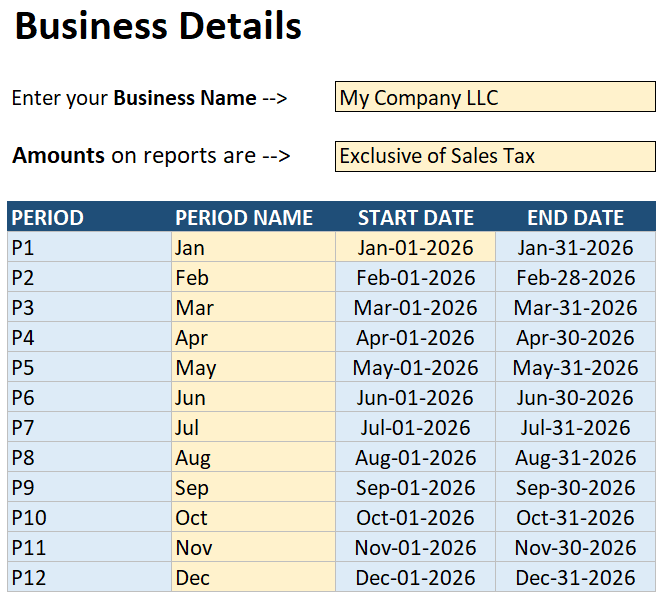
Custom Business Settings
Set up the template to cater for your unique requirements:
Enter the Business Name you'd like to see on your financial statements.
Choose whether you want the numbers on your financial reports to Include or Exclude sales tax.
Enter the Start Date of your business' financial year and the rest of the dates will be auto-generated for you!
Enter whatever Period Names you like based on what you want to see on your Income Statement.
Chart of Accounts
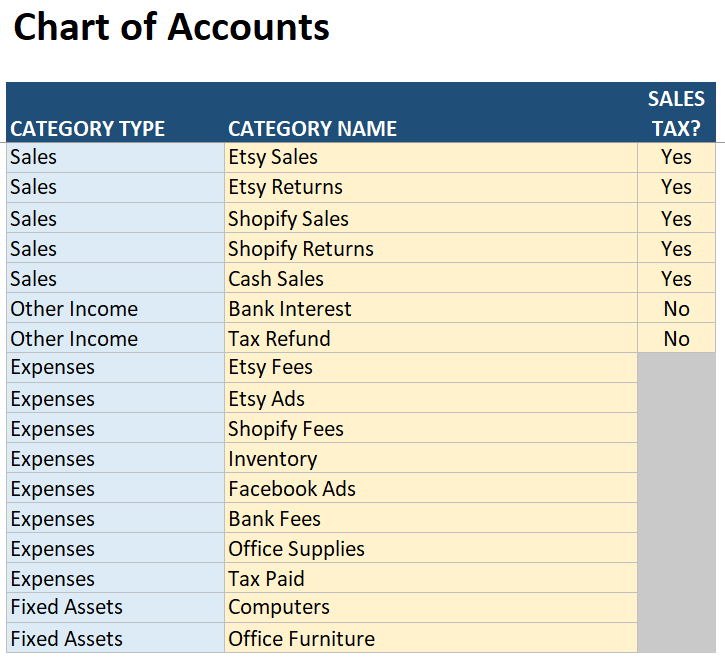
Gain a clear picture of your business finances by monitoring revenue and expenses in their own categories:
Enter up to 15 Revenue categories.
Choose whether Sales Tax Applies to each revenue category.
Enter up to 50 Expense categories.
Enter up to 5 Asset Purchase categories.
Organise Sales by product (e.g. iPad case), sales channel (e.g. Etsy) or your own custom categories.
Your categories will appear in a drop-down menu in the Transactions worksheet for you to use.
Sales Tax Nexuses
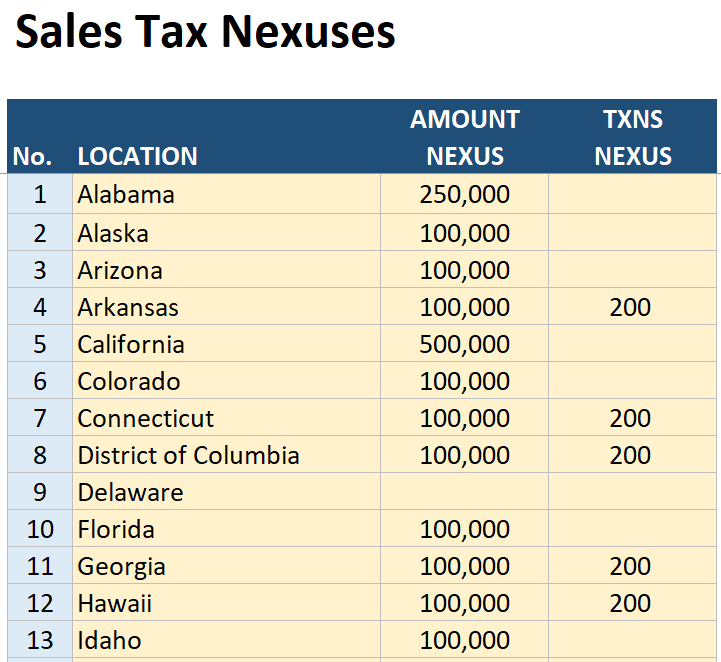
Enter the sales nexus amount and/or transaction volume for your sales locations:
Enter up to 100 locations!
The locations can be whatever you like - States, Cities, Countries or anywhere else you need.
Enter an optional Sales Tax Amount Nexus for each location.
Enter an optional Sales Tax Transaction Nexus for each location.
This helps to pinpoint which state thresholds you've exceeded so you never get caught off guard by sales tax.
Transactions
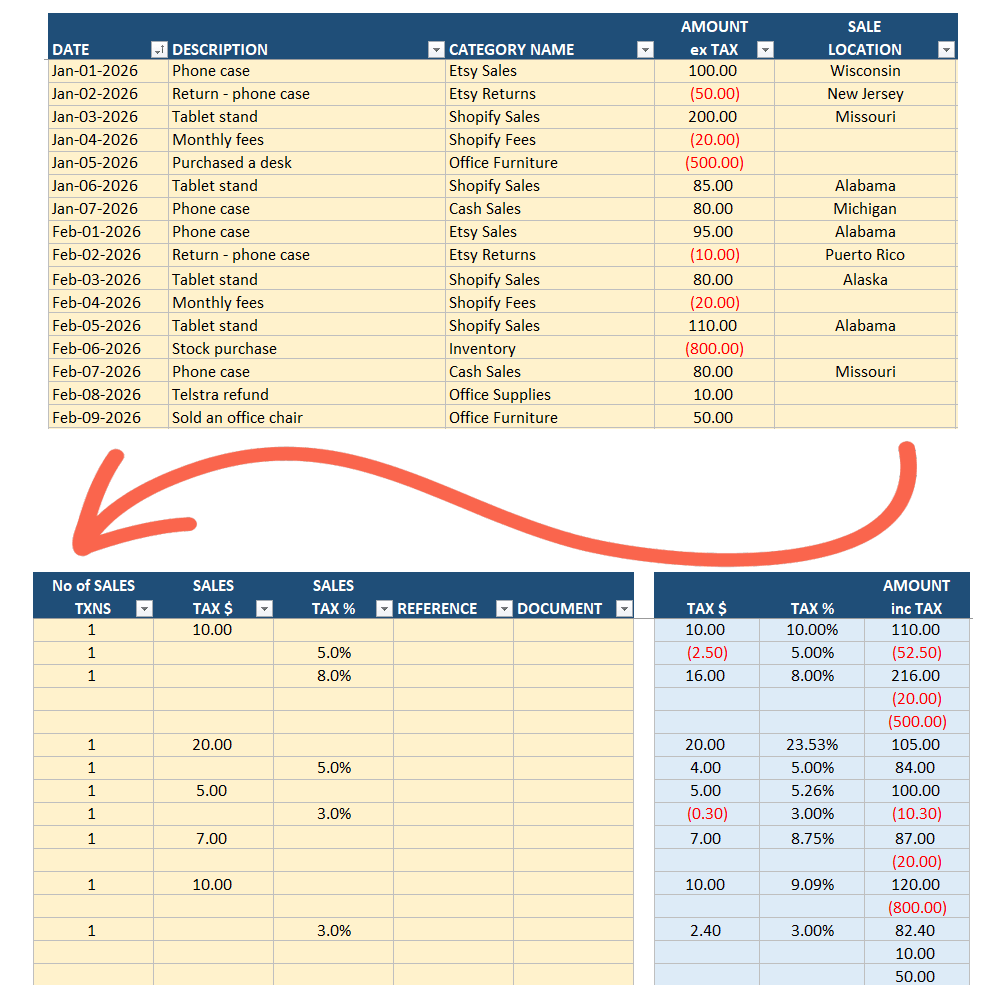
Enter all your business transactions in one organized place:
Record up to 20,000 transactions with ease!
Built-in Controls prevent you from entering dates outside your financial year.
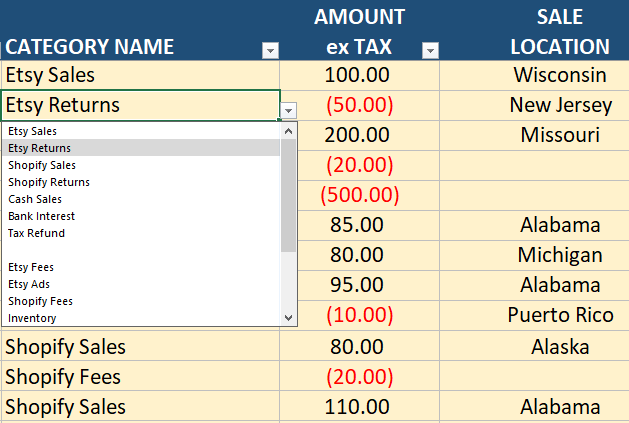
Choose a Revenue, Expense or Asset Purchase Category from a drop-down list made from your Chart of Accounts.
Choose a Location for sales tax purposes from a drop-down list.
Bulk Sales can be entered as one transaction to speed up your data entry.
Enter either a Sales Tax $ amount or Sales Tax % for each sales transaction.
Add an optional Reference Number (e.g. invoice number).
Enter Hyperlinks to documents stored on your device or cloud services like Google Drive.
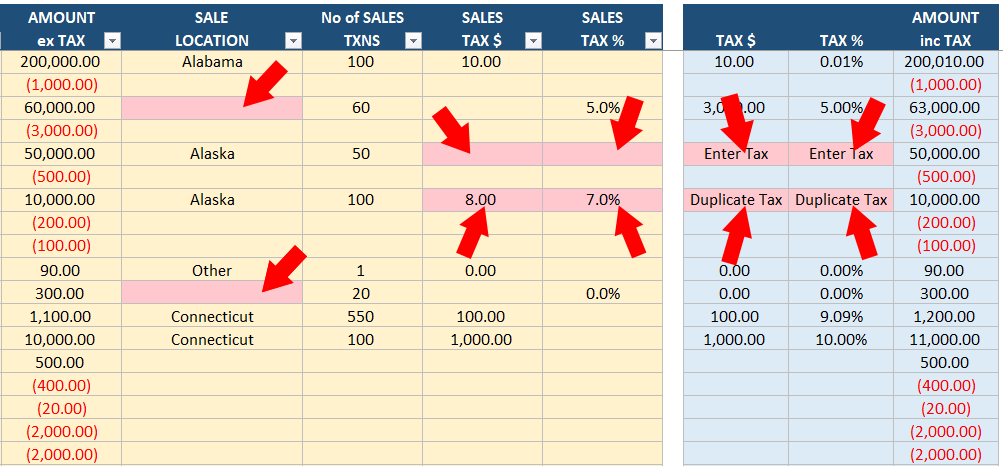
Built-in Error Checking helps ensure key details like dates, sales tax percentages and amounts are not missed.
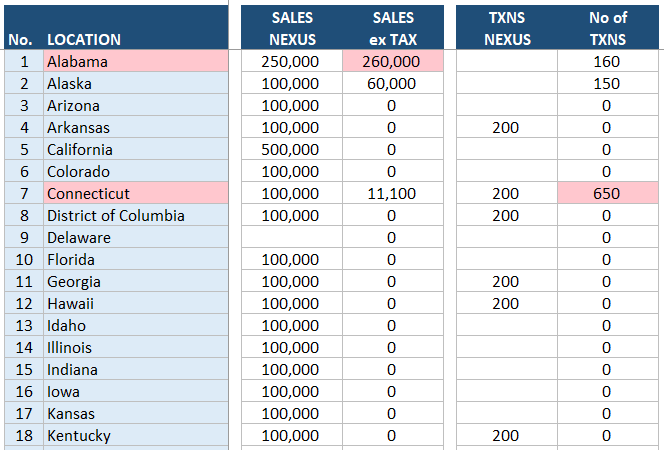
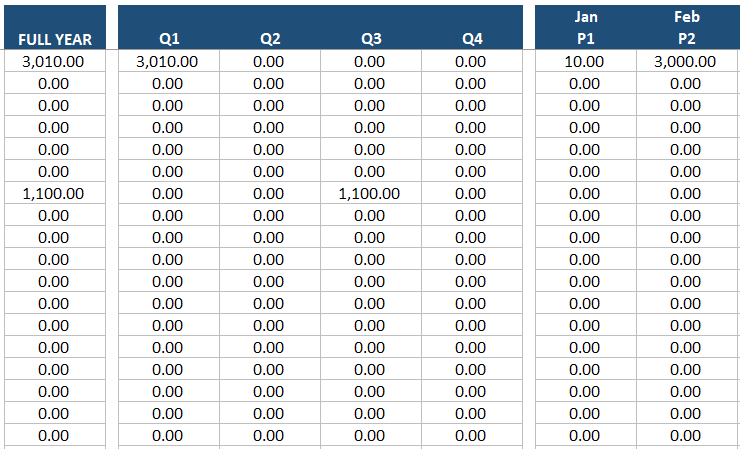
State Sales Tax & Nexus Report
This automated report monitors your revenue state-by-state, showing you exactly where you have crossed economic nexus thresholds:
State-by-State Breakdown: Monitor your total revenue and transaction volumes for up to 100 unique locations.
Nexus Threshold Monitoring: Easily see which locations you have gone over the threshold and may be required to pay sales tax.
Time-Period Tracking: See your estimated sales tax clearly by Month, Quarter, and Full Year.
Note: These figures are Estimates for tracking purposes. Be sure to calculate your exact tax liability for any location where you exceed the threshold.
Income Statement
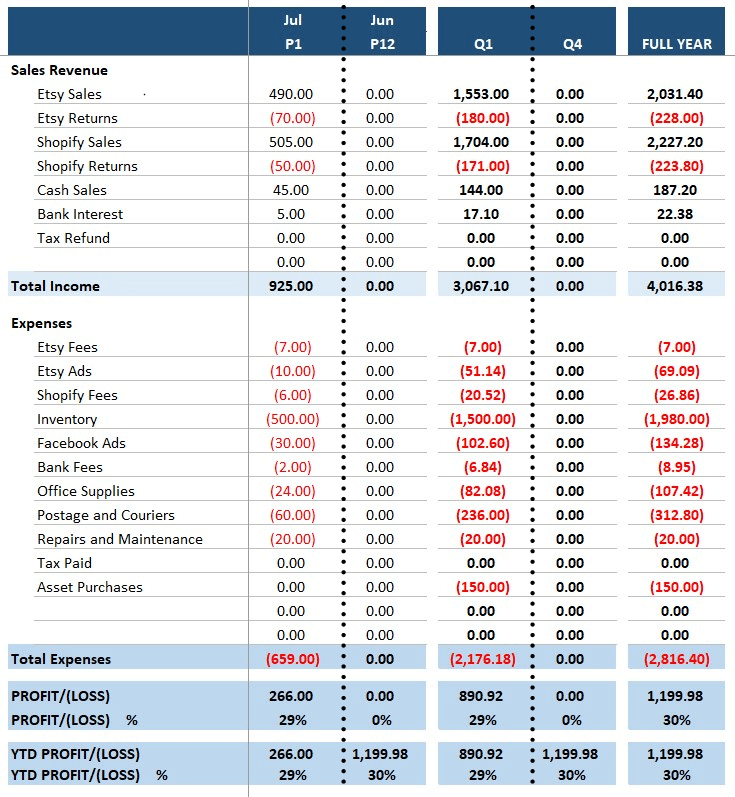
Effortlessly track your business profitability with a detailed Income Statement that displays:
Every Revenue and Expense category line by line.
Subtotals for Total Revenue and Total Expenses.
Each individual Month.
Totals for all four Quarters.
Total of the Full Year.
Total Profit/(Loss) for each month, each quarter and for the full year.
Year-To-Date Profit/(Loss) for each month, each quarter and for the full year.
Profit/(Loss) as a percentage for each month, each quarter, the full year and year-to-date.
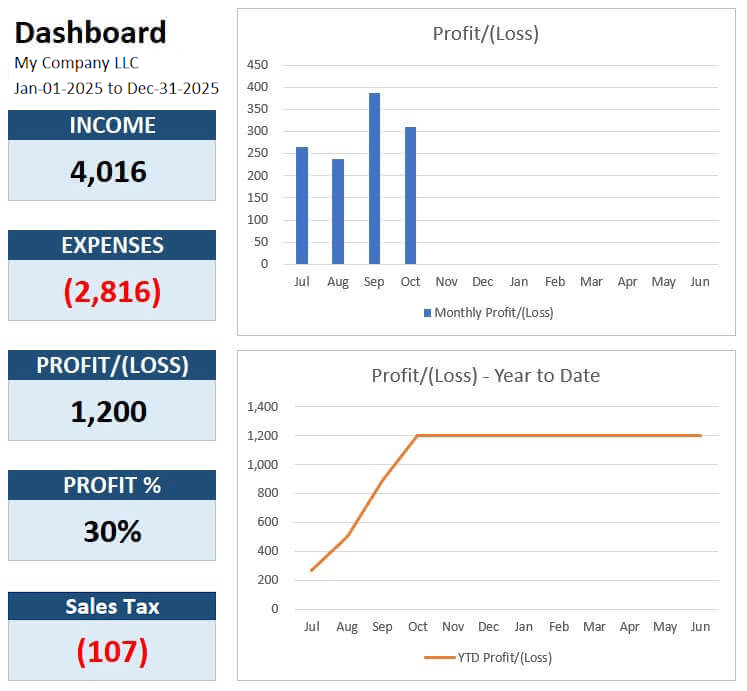
Dashboard
A clean, streamlined dashboard gives you a visual snapshot of your business performance, showing:
Year-To-Date totals for Income and Expenses.
Year-To-Date Profit/(Loss) as a number and percentage.
Total Sales Tax incurred.
A chart that shows Profit/(Loss) by month.
A chart that shows Year-To-Date Profit/(Loss) by month.
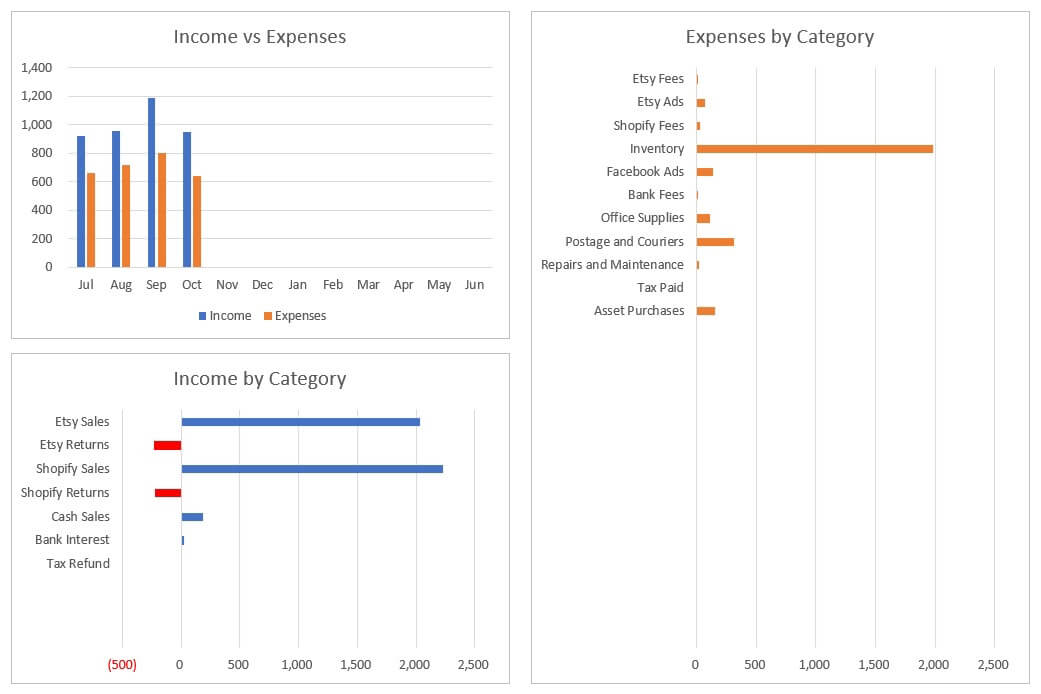
A chart that show Income vs Expenses by month.
A chart that shows year-to-date Income by category.
A chart that shows year-to-date Expenses by category.
Summary Report
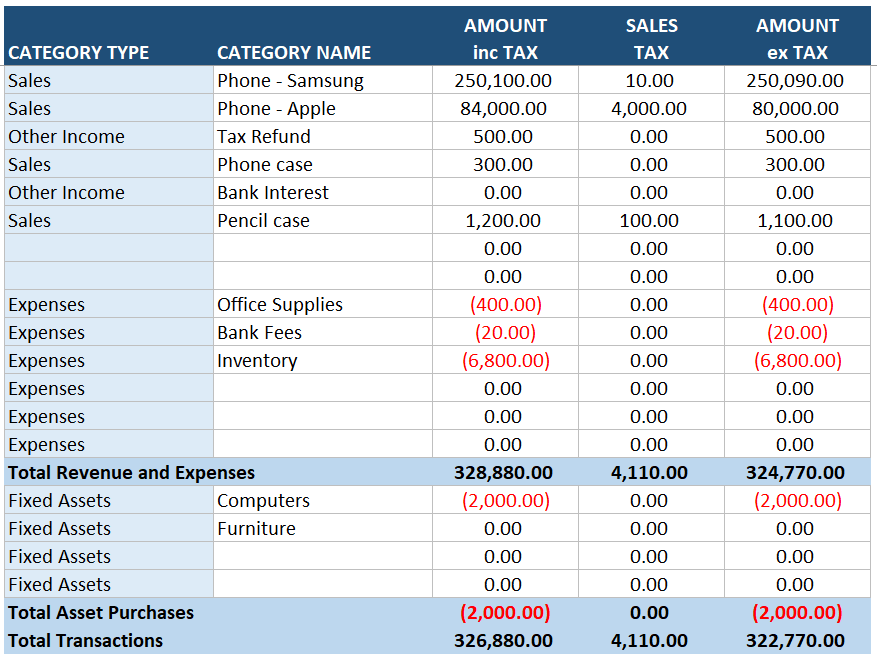
The Summary Report provides a consolidated, high-level snapshot of your numbers:
Each revenue and expense category.
Total Revenue and Expenses.
Each Asset Purchase category.
Total Asset Purchases.
Total Transactions including Sales Tax.
Total Sales Tax separated out.
Total Transactions excluding Sales Tax.
Error Checking
Smart safeguards embedded right into the spreadsheet ensure your financial numbers remain accurate with:
Visual Mistakes Flagged: The sheet applies instant color-coding cues to call out formatting errors or typos for immediate correction.
Proactive Warning Boxes: Integrated pop-up alerts notify you to address potential entry issues on the fly.
Locked and Protected: Core calculations and critical cells are completely secured to prevent accidental deletions or formula breaks.
Incomplete or Invalid Transactions are excluded and will not flow through to your reports.
Video Instructions
A comprehensive Video Tutorial takes the guesswork out of managing your spreadsheet:
Downloading and opening your template.
Customizing the settings for your specific business.
Recording different everyday transaction types.
Organizing all your ledger entries chronologically.
Spotting and fixing any formatting mistakes quickly.


PDF Instruction Book
Prefer reading over watching videos? This printable PDF Handbook lets you:
Search and scan for setup answers faster than skipping through video clips.
Keep a digital reference guide on hand even when you are working offline.
Print out a physical copy to customize with your own bookkeeping notes.

Excellent Instructions
"Can not thank you enough for this spreadsheet and the tutorial. I appreciate you so!"
AXELLE - YouTube Comment

Best Spreadsheet Available
"This is the best spreadsheet available. You made it so easy to change the Category Names."
BRAD - YouTube Comment
Hi, I'm Mark Cunningham
And I built this template to solve the multi-state sales tax nightmare!
Standard accounting software is expensive and most basic platforms don't give you a clear, simple way to monitor economic nexus.
That's why I built this tracker - to provide an affordable way for online sellers and multi-state businesses track sales in multiple locations.
I want to make compliance simple for you, which is why this template is designed to help you:
Save hundreds of dollars each year.
Monitor up to 100 locations in real time.
Avoid the disorganized Etsy templates.
And more!


Spoilt for Choice
"It’s well worth the price as using your spreadsheet means you can do your tax each day if needed or weekly, monthly or quarterly. Spoilt for choice :)"
STEVE - Shopify Seller

Saves Time and Money
"I run a restaurant and don't have time to create a bookkeeping template and I don't have money to spend on software. It's all draining. This is good!"
SUGI - Restaurant Owner
Smarter, Hassle-Free Compliance
Why this template is the ultimate tool for multi-state sellers

Skip Pricey Subscriptions
Avoid dropping a small fortune on expensive software. This sheet delivers top-quality Location Tracking for a single, flat price.

Clean & Focused Layout
Steer clear of chaotic, over-designed Etsy Templates. Our streamlined dashboard skips the useless fluff, giving you a professional window into your multi-state financials.

Made for USA Sales Nexuses
Built for American online sellers and multi-location businesses so you always know exactly where your sales numbers stand.

Zero Tech Frustration
You don’t need to be an Excel Wizard to use this. With crystal-clear setup instructions, you’ll be confidently entering transactions and monitoring sales in minutes.
Stop throwing away $600+ a year or burning precious hours making your own spreadsheet. Instead, get our ...
USA Multi-State Bookkeeping & Sales Nexus Tracker
For a budget-friendly investment of only $37 USD.
EXCEL VERSION
$37
USD one-time payment
Do your bookkeeping in Microsoft Excel
Track up to 100 States or custom locations
Built-in Economic Nexus threshold monitoring
15 Income & 50 Expense categories
5 Asset purchase categories
20,000 Transactions
Full Video and PDF instructions
Location Tax reports with Monthly, Quarterly and Annual numbers
Income Statement & visual Dashboard
Summary Report for your accountant
Built-in Error Checking
SHEETS VERSION
$37
USD one-time payment
Do your bookkeeping in Google Sheets
Track up to 100 States or custom locations
Built-in Economic Nexus threshold monitoring
15 Income & 50 Expense categories
5 Asset purchase categories
20,000 Transactions
Full Video and PDF instructions
Location Tax reports with Monthly, Quarterly and Annual numbers
Income Statement & visual Dashboard
Summary Report for your accountant
Built-in Error Checking
Got Questions?
We've got answers!
This spreadsheet is built specifically for United States business owners, especially e-commerce sellers (Shopify, Amazon, Etsy, WooCommerce) and physical brands who sell across multiple states. If you require a clean, straightforward system to run your daily bookkeeping while simultaneously monitoring your revenue state-by-state to manage sales tax compliance, this is exactly what you need.
Economic nexus rules state that once your business passes a specific revenue milestone in a state (often $100,000), you are legally required to register and collect sales tax there. This template features a specialized layout where you can track up to 100 custom locations. As you enter transactions and assign them to a specific state, the template actively compiles your year-to-date totals, giving you an early warning before you cross those legal thresholds.
The spreadsheet provides a basic calculation of sales tax by location across monthly, quarterly, and annual intervals to help you monitor your growth. However, it is designed as a threshold tracking tool rather than a final tax return calculator. Once you surpass a location's revenue threshold, you will need to determine and calculate your actual, exact sales tax liability according to that specific state or region's tax laws.
Yes. While this specific template is configured for the US financial structure, the location tracking field is 100% customizable. You can use the 100 available slot fields to enter US states, Canadian provinces, European countries, or any custom geographic region that matches your business model.
Yes. Within your Chart of Accounts, you can set up to 15 unique income categories. You can organize these categories by product type, or use them to isolate your revenue streams by marketplace (e.g. "Shopify Sales", "Amazon FBA", "Wholesale Revenue") so you can see exactly which platform is driving your multi-state growth.
We have specific templates for some countries. If you want to request a template for your country please send us a message via the form on our Contact page.
Yes, absolutely. By selecting the Excel edition at checkout, you'll be directed to a secure page to download the .xlsx file directly to your desktop. You can open and use it immediately in any modern version of Microsoft Excel.
Yes. If you prefer cloud-based bookkeeping, choose the Google Sheets version. After checkout, you will receive a secure link that prompts you to make a private, editable copy of the file directly inside your personal Google Drive account.
None at all. This is a strictly one-off purchase. Once you buy the template, it belongs to you forever. You are free to save blank copies of the file to use for multiple distinct businesses or across several different financial years without ever paying a renewal fee.
Although the template's worksheets are locked to prevent accidentally deleting or overwriting formulas, you can request the unlock password and customize the template to suit your business needs. Please note that we do not provide help for any issues that arise due to modifications . Also, due to copyright laws, you cannot sell our templates either with or without modifications.
While the included step-by-step video walkthroughs and PDF user guide cover almost everything, you can always reach out if you hit a snag. Simply drop us a line through the form on our Contact page, and we’ll be happy to help you out.
THE BOOKKEEPING CHANNEL
Our mission is to help small business owners do their own bookkeeping and grow their businesses!
© 2025-26 The Bookkeeping Channel. All rights reserved.